logo Convergence Playtop
Home Arcade Thi Thinking Classic Class About
Sign In
My Profile Logout
  1. Home
  2. /
  3. Fantasy Dragon Creator: Custom Design
Fantasy Dragon Creator: Custom Design

Fantasy Dragon Creator: Custom Design

Developer: Kodiak Peak Studio
Updated: 2026-10-01
| Fantasy , Creative , Design , Simulation , Art , Dragon Creator , Character Customization
Fantasy Creative Design Simulation Art Dragon Creator Character Customization

Review

Fantasy Dragon Creator: Custom Design focuses on open-ended creativity rather than challenges or scores. Its strength lies in the breadth of options—body shapes, color wheels, patterns, wing styles, and accessories—combined with a drag-and-drop interface that works on desktop and mobile. The absence of timers and the inclusion of undo and reset buttons encourage experimentation. The moderated gallery adds a safe sharing element without chat. It best suits players who enjoy visual design and want a relaxing, pressure-free experience, though those seeking action or progression systems may find it limited.

About This Game

Building Your Dragon from Scratch

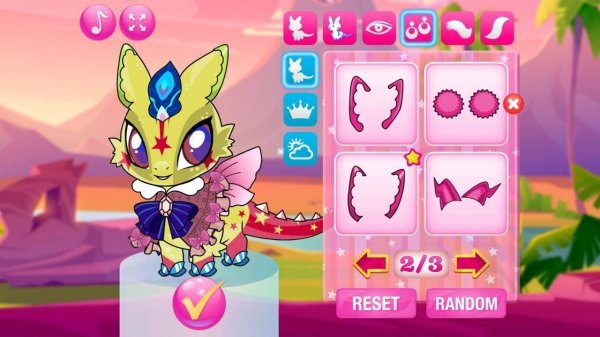
Every creation starts with a blank dragon template. From there, you choose a body shape and size, then move to color selection using a wheel with dozens of hues. Patterns like scales, spots, and gradients can be layered onto the body. Eye shape and color determine the dragon's expression, ranging from playful to majestic. Wings come in feathered, bat-like, or butterfly-inspired styles, each adjustable in size and color. The tail can be finished with spikes, fins, or a fluffy tip, and accessories such as hats, bows, and collars complete the look.

A Calm, Pressure-Free Interface

The menu uses drag-and-drop controls that work on both desktop and mobile. Large, labeled icons make navigation simple for younger players. A real-time preview window updates as you make changes, and an undo button plus a reset option let you experiment freely. There are no timers or scores, so the experience stays focused on creative exploration rather than competition.

Visual Style and Atmosphere

The art direction favors bright, saturated colors and friendly character designs. Backgrounds use soft gradients and subtle animations like floating clouds or twinkling stars, creating a calm environment. Dragons have rounded shapes and expressive features, avoiding intense or frightening elements. The palette includes pastels, neons, and earth tones, so designs can be cheerful, bold, or natural.

Sharing and Gallery Features

Once a dragon is complete, you can save it as an image file. A built-in sharing option lets you post to a moderated gallery, where other players can view and like creations. There is no chat or direct messaging, which keeps the space safe. The gallery is organized by popularity and recent submissions, offering inspiration. You can also export your dragon as a wallpaper or avatar for use outside the game.

Learning Through Play

The design process supports color theory learning as players experiment with complementary and contrasting colors. Pattern recognition grows as textures are mixed and matched. Choosing between wing styles or accessory combinations exercises decision-making. The open-ended format encourages problem-solving and creative thinking. Basic use requires no reading, making it accessible to pre-literate children, and the game introduces concepts of symmetry and balance in visual design.

Editorial Notes

No Timers or Scores

The deliberate removal of timers and scores shifts the focus entirely to creative exploration. This design choice reduces pressure and makes the game accessible to players who prefer a relaxed pace over competitive mechanics.

Moderated Gallery Safety

The gallery allows sharing and liking but excludes chat or direct messaging. This structure provides community inspiration while limiting interaction risks, a thoughtful approach for a game aimed at younger players.

Educational Color Theory

Experimenting with complementary and contrasting colors, as well as layering patterns, supports color theory learning. The open-ended format lets players discover these concepts naturally through trial and error rather than through explicit lessons.

Accessible for Pre-Literate Users

Because basic use requires no reading, the game can be enjoyed by pre-literate children. Large icons and drag-and-drop controls further lower the barrier, making it one of the more inclusive creative tools in its category.

Compatibility

✅ Works on PC & Mobile | Recommended: Chrome / Safari / Edge

Share:

Faq

Is Fantasy Dragon Creator: Custom Design free to play?
The provided information does not specify a price or payment model. It describes a game with no timers or scores, but does not mention in-app purchases or subscription fees. You would need to check the official store listing for current pricing details.
Can I play Fantasy Dragon Creator: Custom Design on my phone?
Yes, the interface uses drag-and-drop functionality that works on both desktop and mobile devices. Large icons and clear labels are designed to make navigation simple on smaller screens, so you can create dragons on a phone or tablet without losing access to the main customization tools.
Does the game have multiplayer or chat features?
No. Sharing is limited to a moderated gallery where players can view and like creations. There is no chat or direct messaging, which the game includes to ensure safety. You cannot communicate directly with other players, but you can still browse submissions for inspiration.
What can I customize on my dragon?
You can adjust body shape and size, choose from dozens of colors, layer patterns like scales, spots, and gradients, and pick eye shapes and colors. Wings come in feathered, bat-like, or butterfly styles, each adjustable in size and color. Tails can have spikes, fins, or a fluffy tip, and accessories include hats, bows, and collars.
Is Fantasy Dragon Creator: Custom Design suitable for young children?
Yes. The game avoids intense or frightening elements, uses rounded shapes and expressive features, and requires no reading for basic use. There are no timers or scores, reducing pressure. The calm backgrounds and friendly art direction make it appropriate for young children, though adult supervision is always recommended for online sharing.
Can I save or share my dragon outside the game?
Yes. Once a dragon is complete, you can save it as an image file. The game provides a built-in sharing option for posting to a moderated gallery, and you can also export your dragon as a wallpaper or avatar for use outside the game. This lets you keep or display your creation beyond the app.

Comments

0 comments
U
User
★ ★ ★ ★ ★
Please login to post a comment.
Loading comments...

Related Games

Prehistoric Coloring Book Journey
▶

Prehistoric Coloring Book Journey

Junior , Prehistoric , Coloring , Art
Hero Tapper Idle Quest
▶

Hero Tapper Idle Quest

Thinking , Strategy , Puzzle , Casual , Idle , Clicker , Fantasy
Toddie Holiday Dress Up
▶

Toddie Holiday Dress Up

Dress Up , Holiday , Creative
Ally's Daily Life Simulator
▶

Ally's Daily Life Simulator

Girls , Family , Simulation , Casual , Life , Kids , Fun
Princess Fashion Quiz Dress Up
▶

Princess Fashion Quiz Dress Up

Girls , Fashion , Dress Up , Creative , Casual , Quiz , Style
Creative Milkshake Decor Game
▶

Creative Milkshake Decor Game

Creative Design , Decoration , Customization , Casual , Family , Art , Puzzle
Fashion Show Stylist Adventure
▶

Fashion Show Stylist Adventure

Fashion , Styling , Creative
Kendel Weekly Fashion Challenge
▶

Kendel Weekly Fashion Challenge

Fashion , Dress Up , Creative , Casual , Family Friendly , Puzzle

Convergence Playtop

  • Home
  • Arcade
  • Thi
  • Thinking
  • Classic
  • Class
  • About
  • Terms of Use
  • Privacy Policy
  • Contact Us
  • Disclaimer

© 2026  Convergence Playtop All rights reserved.

↑

Share this page

Copy the link below to share this page: