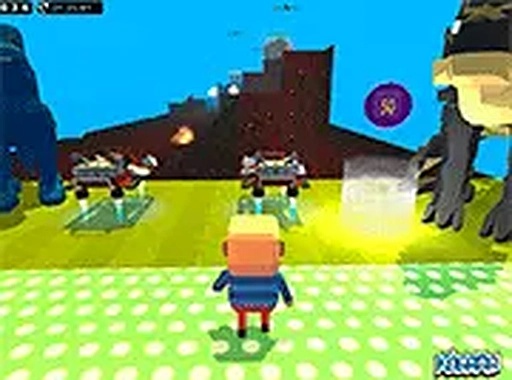
Dino Leap: Parkour Platformer delivers a satisfying challenge for players who enjoy precision jumping. The stages are thoughtfully designed, gradually increasing in difficulty without becoming frustrating. Multiplayer mode adds a welcome social layer, allowing for cooperative or competitive play. The colorful dinosaur visuals are appealing and family-friendly. Controls are responsive and easy to learn, making the game accessible to newcomers while still offering enough depth for experienced platformer fans. It runs smoothly in a browser with no downloads, perfect for quick sessions.
Dino Leap: Parkour Platformer centers on precise jumping and timing. Players control a character moving through a series of stages filled with platforms and hazards. The primary challenge is to navigate from one end of each stage to the other without falling into obstacles such as acid blocks. Success depends on careful observation of platform spacing and movement patterns. The game rewards players who can maintain a steady rhythm and adjust their jumps on the fly.
Stages are designed with increasing complexity. Early levels introduce basic platform layouts, while later stages incorporate moving platforms, narrower gaps, and more frequent hazards. The difficulty curve encourages players to develop their coordination gradually. Each stage feels distinct due to variations in platform arrangement and obstacle placement. This structure provides a sense of accomplishment as players master each new challenge.
The game includes a multiplayer mode that allows friends to play together in the same session. Players can choose to cooperate by helping each other through tricky sections or compete to see who finishes first. This social element adds replay value and makes the experience more engaging. The multiplayer feature works seamlessly in the browser, with no additional setup required.
Dino Leap features bright, colorful 3D graphics that create a cheerful dinosaur-themed world. The visual design is family-friendly and suitable for players of all ages. Controls are simple, using standard keyboard inputs (arrow keys or WASD and spacebar). The game runs directly in a web browser on desktop computers, with no installation or account creation needed. A full-screen option is available for an immersive experience.






Comments
0 comments