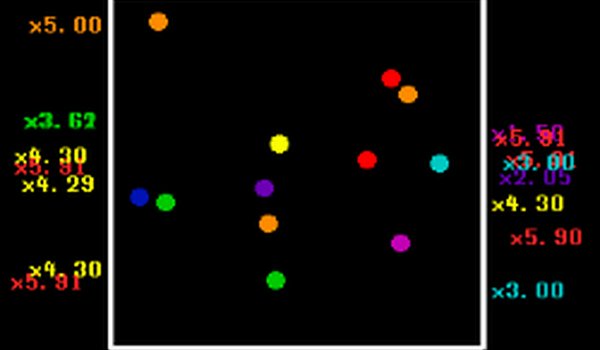
Hue Drift succeeds as a low-pressure idle game by focusing entirely on visual serenity. The simple act of collecting colors and watching them bounce creates a surprisingly meditative loop. The automatic saving and short session length make it easy to fit into a busy day. While it lacks depth or challenge, that is precisely its strength. It is a well-executed tool for unwinding, suitable for anyone seeking a quiet moment away from more demanding games.
Hue Drift centers on the simple pleasure of watching colors move. You begin with a basic set of tones, and each additional shade you acquire brings a new bouncing pattern to life. There are no objectives to complete or enemies to overcome. The entire experience is designed around the quiet joy of observing a growing collection of vibrant hues drift across your screen.
Interaction is minimal and intuitive. Using only a mouse or touch input, you select new colors from an in-game shop. Each purchase immediately adds a bouncing element to your display. The game saves your progress automatically, so you can step away and return later to find your collection still active. This makes it ideal for short breaks or longer periods of passive enjoyment.
The visual presentation is bright and cheerful, with each color bouncing in its own unique rhythm. The animations are smooth and gentle, avoiding any jarring movements. Over time, the screen fills with a dynamic tapestry of shifting hues that create a calming effect. The lack of flashing or intense effects makes it suitable for players who prefer a low-stimulation environment.
Sessions are naturally short, typically lasting around five minutes, though you can stay longer if you wish. The game requires no special skills or prior knowledge, making it accessible to players of all ages. The idle nature means your collection continues to grow even when you are not actively clicking, encouraging occasional check-ins to see how the display has evolved.
The primary goal is relaxation. There are no timers, scores, or competitive elements to create pressure. The game encourages you to experiment with different color combinations and observe how they interact. This open-ended approach allows each player to create a unique visual experience that reflects their personal taste.





Comments
0 comments